
ERP module guide
Automation, AI and integrations inside a real estate ERP
As property businesses scale, repeat work starts to consume disproportionate time. Notifications, reminders, follow-up tasks, document generation, updates, exports, handovers and reconciliations all create administration that grows faster than the headcount can comfortably absorb. That is where automation and integration become an essential part of the ERP story rather than a nice-to-have.
A stronger real estate ERP should help the business trigger actions automatically, move information between workflow stages more cleanly, connect with the right external systems and surface important case information more clearly. AI also becomes more useful in this setting when it helps summarise history, highlight overdue points, suggest next actions or improve team visibility rather than simply adding noise.
What this module should help the business do in practice
Automation matters most when it strengthens control rather than hiding it. In an ERP context, the best result is a business that feels easier to run without becoming harder to understand.
ERP value is created through connection, not through labels alone. In Proplix, each module becomes more useful when it reduces fragmentation, improves service consistency and gives staff and leadership a clearer operating picture.
Core functionality that should exist here
- Automated reminders, recurring tasks and stage-based triggers
- Integration hooks for connected digital operations
- AI-assisted case visibility, summaries and productivity support
- Reduced manual duplication across departments and workflows
- Cleaner scaling because process automation grows with the business
Why this belongs inside the ERP instead of outside it
When this capability sits outside the ERP, teams usually lose continuity. Records have to be re-entered, context is diluted, stakeholders are split across systems and reporting becomes less reliable. By keeping this module inside the wider platform, the business can carry data, actions, financial context, document history and accountability forward more cleanly from one stage to the next.
That is why the ERP position is stronger than a standalone module position. The module still matters on its own, but its value rises sharply when it is part of one connected operating model.
How this capability fits the wider Proplix platform
Proplix presents automation, ai & integrations as part of a full real estate ERP rather than as an isolated feature. Buyers want to know how the capability works alongside CRM, PMS, financials, compliance, portals, documents and reporting. Together, these connected capabilities form a strategic operating platform rather than a module catalogue.
Proplix explains each feature in the context of the wider operating model, so visitors can understand both the function itself and the business value created when it connects with CRM, property management, compliance, portals, finance and reporting.
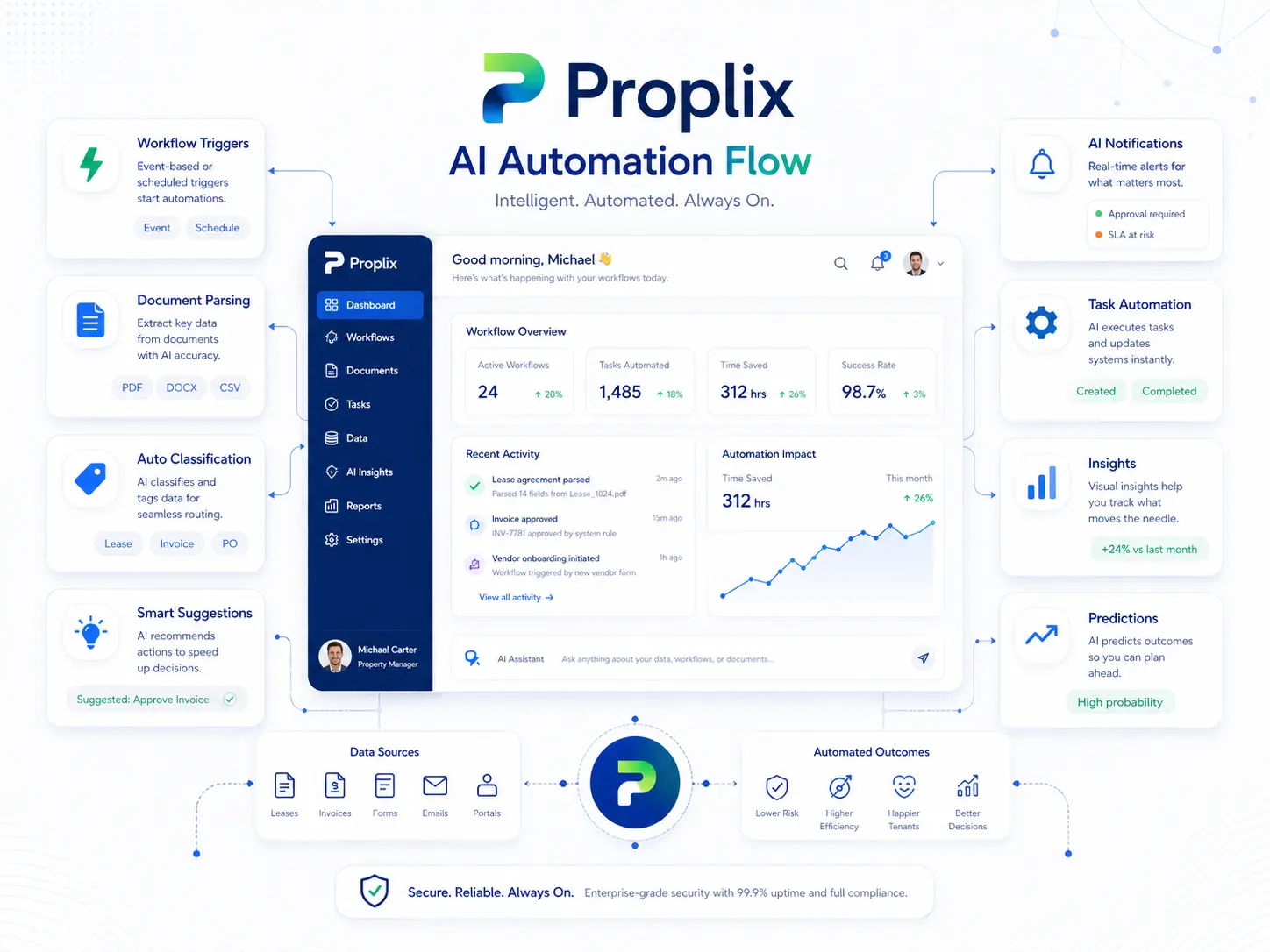
Platform illustration
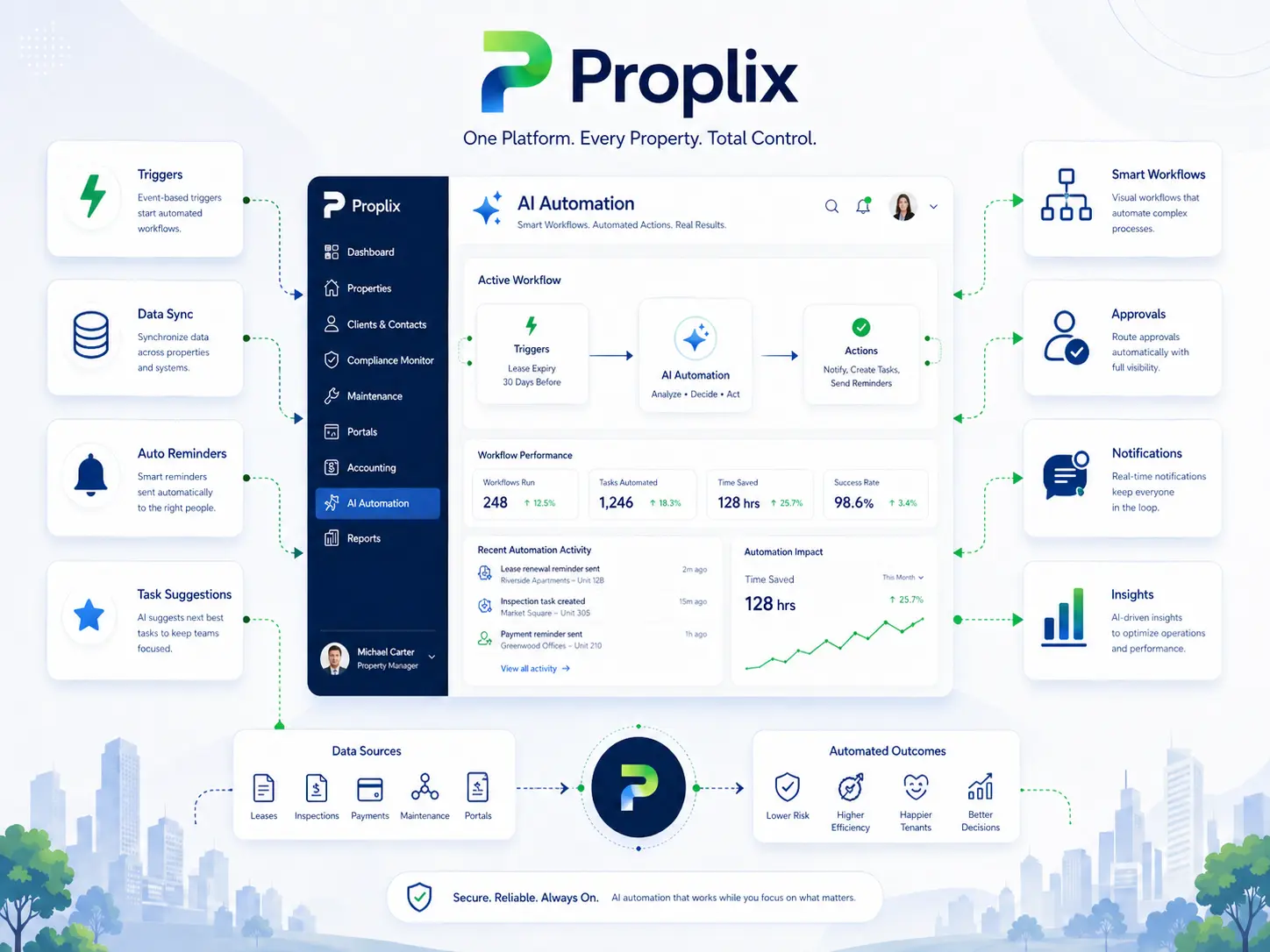
A visual view of automation and AI-assisted operations
This illustration reinforces the role of automation and AI inside a stronger ERP model: helping the business surface priorities, reduce manual drag and connect workflow stages more clearly without losing operational control.
Designed around the operating model
How Automation Ai And Integrations fits into dependable property operations
Useful software should make the real operating position easier to understand, including where information is incomplete or a decision is still pending. Organisations may use similar property records while running very different services. The right solution reflects who owns each decision, how work moves between teams and what clients, residents, landlords or partners genuinely need to see.
Give each role enough context to act
Front-line teams need fast access to the current position, managers need an honest view of workload and risk, and external users need controlled visibility that reduces unnecessary chasing. Each audience should see the same underlying operation through an appropriate role-aware view. For Automation Ai And Integrations, that means access should follow an evidenced business need and change when responsibility changes.
Keep the reason beside the action
Service quality often weakens at the handover between enquiry, instruction, tenancy, maintenance, finance and compliance. Connecting those stages makes responsibility visible and helps the next person understand what has already happened before taking action. This makes the Automation Ai And Integrations record more useful during absence, escalation, service review or a later audit.
Design for the case that does not fit
Property work includes incomplete forms, late evidence, changed instructions, unavailable suppliers and circumstances requiring discretion. The system should expose those exceptions, preserve notes and direct them to an authorised person instead of silently forcing a misleading “complete” status.
Configure from representative work
A rollout works best when the organisation agrees its operating language, record ownership and exception routes before configuring screens. Pilot work should involve the people who complete the process, not only those who receive the final report. Document what remains outside the system as well, so teams understand the boundary between Proplix, connected services and professional responsibility.
Measure whether the work is improving
Useful measures include response consistency, outstanding actions, repeat data entry, time lost locating evidence and the quality of updates supplied to stakeholders. Those indicators show whether the operating model is becoming easier to manage. Review findings with the people completing Automation Ai And Integrations work, because a dashboard may not reveal the manual workaround being used beside it.
Keep guidance, permissions and records current
Ownership, legislation, services and internal policies change. Schedule periodic checks of access, templates, notifications, integrations and retained information. Record material changes and brief affected users so the configured workflow continues to reflect the organisation’s approved way of working.
Proplix supports structured workflow and evidence handling; it does not provide legal advice or remove the need for competent human review. Discuss your organisation, migration or integration requirements through the central secure enquiry route.
Discuss Automation Ai And Integrations requirements →Plan your next step
Bring a typical case, the systems you use and the main problem you want to solve. Together we can map the records, responsibilities and checks needed for a useful first release.
Explore software integrations, compare enterprise modules or discuss a custom property workflow. The agreed scope will explain what is included, what needs configuration and how your team will be supported.