
From first enquiry to long-term management
Applications, onboarding, agreements, compliance checks, repairs, supplier work, payments, communications and reporting can be handled as parts of the same operational story.
Proplix brings the work behind modern property operations into one connected environment — from listings and tenancy onboarding to compliance, maintenance, finance, stakeholder portals, automation and portfolio intelligence.
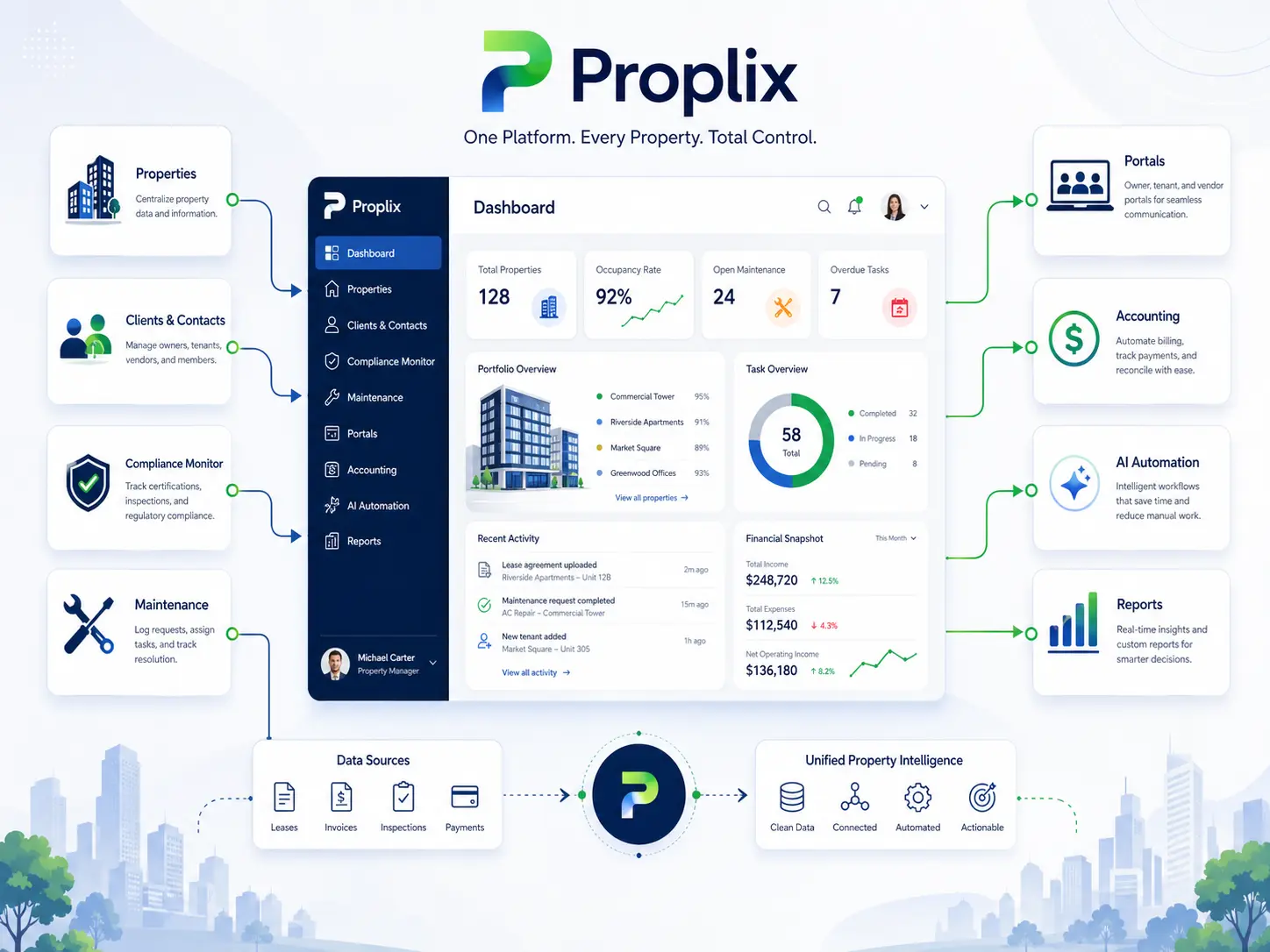
Property teams rarely struggle because they lack another isolated tool. The harder problem is keeping people, evidence, actions, money and decisions connected as a property moves through its lifecycle. Proplix is structured around that operating reality.
Applications, onboarding, agreements, compliance checks, repairs, supplier work, payments, communications and reporting can be handled as parts of the same operational story.
Where a workflow needs review, approval, evidence or an audit trail, Proplix is designed to keep those controls visible rather than hiding them behind a generic task list.
Each area below represents a substantial part of the platform. Together they form a connected operating model for property businesses that need stronger control, clearer evidence and less fragmented administration.
Each category groups related capabilities into a clear operational area. Open a category only when you want the detailed feature list.
Explore the detailed 74-feature directory →
Property identity, rooms, amenities, addresses and the structured data behind each asset.
Owner, agent and linked-property relationships that define who is connected to each record.
Operational state changes across new, active, pending, sold, rented and off-market property records.
Inspection choices, occupancy context and property-use information connected to the live record.
Portfolio refresh, operational insight and property-level reporting across the managed estate.
Additional property controls and supporting operational capabilities.
Each category groups related capabilities into a clear operational area. Open a category only when you want the detailed feature list.
Explore the detailed 42-feature directory →
Create, edit and structure sales or rental listings with the commercial information required to publish them.
Map-led discovery, search controls and tools that help users locate the right property quickly.
Buying and rental request workflows connected directly to property listings.
Public presentation, saved properties and visibility tools for prospective users and stakeholders.
Approval states, vacancy reporting and recurring listing visibility for operational teams.
Each category groups related capabilities into a clear operational area. Open a category only when you want the detailed feature list.
Explore the detailed 55-feature directory →
Staff-level access, permissions and team structures for agents and brokers.
Public/private profile settings, social profiles and verification controls.
Assignment controls, reference codes and supporting account administration.
Owner and landlord profiles, records and relationship information connected to managed properties.
Agent profiles, teams and operational records for real-estate activity.
Business-broker records, profiles and operational management.
Additional landlord, owner, agent and broker capabilities.
Each category groups related capabilities into a clear operational area. Open a category only when you want the detailed feature list.
Explore the detailed 43-feature directory →
Public applications, invitations, rate controls and the entry point into the tenancy journey.
Reusable renter information that reduces repeated data entry across the application process.
Structured current and previous address information for applicant review.
Income sources, proof of income and affordability-related applicant information.
Household members, additional occupants and related occupancy information.
Pet information and rental preferences relevant to the application.
Review, decision and approval-oriented controls used before onboarding.
Each category groups related capabilities into a clear operational area. Open a category only when you want the detailed feature list.
Explore the detailed 75-feature directory →
Application intake, invitations, tokens and secure entry into onboarding.
The main onboarding workspace, stages, state and controlled workflow progression.
Resolve property, landlord, tenant and occupier context before final approval.
Compliance evaluation, approval conditions and final decision controls.
Agreement preparation, certificates and contract records generated through onboarding.
Move-in invoices, financial snapshots and final approval finance records.
Emails, messages and recipient resolution around application and onboarding status.
Audit history, retention, termination, reopening, references and lifecycle evidence.
Each category groups related capabilities into a clear operational area. Open a category only when you want the detailed feature list.
Explore the detailed 58-feature directory →
Draft generation, data population and structured agreement content.
Tenant signatures, landlord countersignature and signing evidence.
Final PDF creation, safe document references and controlled delivery.
Contract conversion, recurring contracts and contract-state management.
Agreement-linked invoices, payments, schedules and financial values.
Certificates and compliance outputs linked to the executed agreement.
Broker-facing contract counts and operational visibility.
Additional agreement, document and execution capabilities.
Each category groups related capabilities into a clear operational area. Open a category only when you want the detailed feature list.
Explore the detailed 52-feature directory →
Rent values, rental types and core calculations used across tenancy finance.
Rent schedules, first-payment controls and invoice-related move-in checks.
Deposit intake, protection, evidence, return funds and export workflows.
Right-to-Rent documents, review, approval and tenant lookup.
Rent-increase and bidding intake, review and record synchronisation.
Rental requests, vacancy reporting and rent-performance visibility.
Visibility, storage and supporting evidence controls around tenancy finance.
Each category groups related capabilities into a clear operational area. Open a category only when you want the detailed feature list.
Explore the detailed 72-feature directory →
Repair reporting, request capture, triage and maintenance-ticket intake.
Command-centre, board, status and permission controls for day-to-day maintenance.
Supplier allocation and work-order handoff from the maintenance workflow.
Completion confirmation, evidence, files and tenant or stakeholder feedback.
Maintenance fees, supplier payment and invoice-related completion controls.
Maintenance reports, PDFs, notifications and outbound communication.
Property characteristics and asset context referenced during maintenance operations.
Additional maintenance and repair capabilities.
Each category groups related capabilities into a clear operational area. Open a category only when you want the detailed feature list.
Explore the detailed 63-feature directory →
Supplier credentials, evidence and assignment-readiness controls.
Quote submission and landlord decision workflows.
Allocation, work orders, job status and controlled job updates.
Supplier invoices, receipts and payout processing.
Supplier performance and portal-side job updates.
Supplier accounts, synchronisation and directory-style operational views.
Site, parcel, access and property attributes relevant to contractor work.
Additional supplier, contractor and work-order capabilities.
Each category groups related capabilities into a clear operational area. Open a category only when you want the detailed feature list.
Explore the detailed 86-feature directory →
Compliance monitoring, case creation, case tasks and case synchronisation.
Financial due-diligence and client-money compliance review operations.
HMO, PRS, licensing and nation-specific compliance operations.
Gas, EPC, alarms, fire, legionella, asbestos, building safety and related statutory areas.
Renewal submissions, remedial actions and due-date decision controls.
Approved records, PDFs and compliance communication outputs.
Evidence intake, uploads and document-reference validation before review.
Human review, approval actions and controlled approval transactions.
Additional compliance-monitoring and governance capabilities.
Each category groups related capabilities into a clear operational area. Open a category only when you want the detailed feature list.
Explore the detailed 84-feature directory →
Gas-safety documents, parsing, review, approval and certificate workflow.
Electrical inspection, EICR, review and electrical-service information.
Energy-performance document intake, review and approval.
Smoke, alarm and detection-related safety evidence.
Fire-risk intake, review, PDFs and approval workflow.
Building-safety intake, review, evidence and audit outputs.
Legionella risk documents, review, evidence and PDF outputs.
Asbestos risk, review, approval and audit outputs.
Each category groups related capabilities into a clear operational area. Open a category only when you want the detailed feature list.
Explore the detailed 58-feature directory →
PRS readiness, database evidence, intake, approval and exports.
HMO licensing evidence, PDFs, review and audit.
Selective and additional licensing intake, review and reporting.
Wales licensing and registration workflows.
Scotland letting-agent registration and audit workflows.
Northern Ireland landlord-registration workflows and audit evidence.
ICO and shared licensing-governance controls.
Each category groups related capabilities into a clear operational area. Open a category only when you want the detailed feature list.
Explore the detailed 62-feature directory →
Identity extraction, document typing and structured evidence handling.
Sanctions and manual credit-check controls.
Retention scheduling, metadata, backfill and execution controls.
HMRC and Making Tax Digital document and review workflows.
ICO review and data-protection audit controls.
AML/KYC notifications, emails and PDF outputs.
Core AML/KYC upload, review, parsing and approval operations.
Additional legal, privacy and governance capabilities.
Each category groups related capabilities into a clear operational area. Open a category only when you want the detailed feature list.
Explore the detailed 51-feature directory →
Reminder and status notifications triggered by live workflow state.
Branded templates and transactional email delivery across the platform.
Recipient resolution and contact-access controls for outbound messages.
Delivery reports, dispatch logs, resends and notification reference tracking.
Notification PDF creation, opening and controlled viewing.
Compliance, deposit-return and governance intimation workflows.
Broker, staff and internal notification handling.
Mail transport, preview, mailbox and outbound-message configuration.
Additional notification and communication capabilities.
Each category groups related capabilities into a clear operational area. Open a category only when you want the detailed feature list.
Explore the detailed 52-feature directory →
Tenant, landlord, supplier, client and broker portal entry points.
Portal relationship matching, visibility and access controls.
Compliance records, certificates and summary information visible through portals.
Portal-side invoicing, payments, expenses and recurring finance.
Contracts, contract tables and sales attachments.
Templates, tables, filters and shared portal-rendering components.
Additional stakeholder-portal capabilities.
Each category groups related capabilities into a clear operational area. Open a category only when you want the detailed feature list.
Explore the detailed 66-feature directory →
Ledger entries, balances and recurring rent-charge generation.
Rent receipts, overdue balances and arrears ageing.
Invoice creation, updates, validation, attachments and invoice PDFs.
Payment recording, processing and supported payment modes.
Landlord payout processing and payout visibility.
CSV staging, suggested matches and reconciliation-batch management.
Financial audit workspace and sanctions-related controls.
Schedules, portal finance and supporting accounting views.
Additional accounting and property-finance capabilities.
Each category groups related capabilities into a clear operational area. Open a category only when you want the detailed feature list.
Explore the detailed 52-feature directory →
Rules, triggers and configuration that define automated behaviour.
Candidate evaluation, preview and pre-execution checks.
Automation queue, approvals and controlled enqueue operations.
Execution of automated actions and task creation.
Due scheduling, next-run calculation and escalation controls.
Scheduled compliance jobs and public/internal cron processing.
Automation logs and execution history.
Staff access and governance conditions applied to automation.
Additional rule and property context used by automated workflows.
Each category groups related capabilities into a clear operational area. Open a category only when you want the detailed feature list.
Explore the detailed 56-feature directory →
AI Q&A, provider responses, staff access and the AI property-manager workspace.
Digital-twin records and unified property timeline context.
Risk calculation, latest risk state and safety-risk review workflows.
Portfolio intelligence refresh and higher-level operational insight.
Dashboards, properties, requests, plans and tenancy context used by intelligence workflows.
Physical property attributes and environmental inputs used in the wider property model.
Internal-user, permission and account context associated with AI-assisted workflows.
Additional AI, risk and digital-twin capabilities.
Each category groups related capabilities into a clear operational area. Open a category only when you want the detailed feature list.
Explore the detailed 63-feature directory →
Operational, sales, tenancy and property-performance reporting.
Audit-pack building, legal-audit workspace and formal evidence packs.
Official PDF exports and generated report documents.
Migration staging and controlled entity migration.
CSV exports and structured audit datasets.
Compliance, PRS, client-money and regulatory report outputs.
Attachments, evidence ZIPs and chain-of-custody audit history.
Additional reporting, audit and export capabilities.
Each category groups related capabilities into a clear operational area. Open a category only when you want the detailed feature list.
Explore the detailed 74-feature directory →
Role, feature and user-permission controls.
Staff security scope, delegated permissions and staff-to-client controls.
Login, remember-me, two-factor, token and password workflows.
Private files, streaming and upload-validation controls.
Broker/client access boundaries and related protected records.
Property-level access, approvals and controlled entry.
Security systems, gates, lights and physical-security attributes.
Accessibility, wheelchair and adapted-property features.
Additional security, administration and lifecycle controls.
These established Proplix collections cut across more than one of the 20 core parent areas. They remain separately available where a customer needs a combined workflow, regulatory reference set or implementation-focused view.
Landlord payments, supplier payouts, reconciliation visibility and finance-aware compliance workflows.
Explore Client Accounts & Compliance Finance →Bring compliance status, missing items, notices, maintenance risk, communications and evidence into one property-level view.
Explore the Single Property Risk Ledger →Workflow templates, warnings, blockers, safe next actions and document packs around tenancy-state operations.
Explore the Renters’ Rights Operating System →Map and import records, handle duplicates, migrate certificates and move away from spreadsheets or older systems.
Explore the Migration Engine →CRM, tasks, reminders, communication, maintenance, compliance, portals and team operations in one connected working model.
Explore Team Work →UK property compliance, tenancy evidence, safety certificates, audit records, reminders and governance references.
Explore UK Compliance & Standards →Operational context can follow the property. A tenancy decision can inform compliance, a compliance issue can create maintenance work, a supplier outcome can feed finance, and each step can remain visible for later reporting and review.
Build the working record around properties, owners, landlords, tenants, applicants, agents, brokers and suppliers.
Coordinate applications, onboarding, compliance checks, agreements, signatures, financial setup and approval gates.
Handle maintenance, supplier work, certificates, communications, notices, documents and stakeholder actions.
Connect ledgers, arrears, receipts, payouts, reconciliation, compliance status and property-level risk signals.
Use reporting, audit history, exports, portfolio intelligence and controlled automation to keep the operation moving.
The platform is designed to give operational teams useful structure while preserving the controls that managers, auditors and growing property businesses need.
Keep property, tenancy, compliance, maintenance, finance and communications connected instead of scattering the record across unrelated tools.
Support document, status, approval and history trails where the process benefits from being reviewable later.
Separate staff and stakeholder experiences so users can work with the information and actions appropriate to their relationship.
Automate repeatable chasing and operational actions while preserving review points for decisions that need human judgement.
Structure workflows around the realities of UK property operations, including compliance evidence, tenancy processes and portfolio governance.
Move from daily record keeping into deeper automation, reporting, migration, portal and portfolio-intelligence workflows as requirements mature.
Practical answers for property teams evaluating how the platform fits into their operation.
Proplix brings property, tenancy, compliance, maintenance, supplier, finance, portal, automation, reporting and AI-assisted operational capabilities into one connected platform. This page groups 1,238 individual capabilities into 20 practical feature areas.
They are presented as clear operating areas, but the value comes from the connections between them. Property data can flow into tenancy, compliance, maintenance, finance, communications, portals and reporting without teams rebuilding the same context in separate tools.
Yes. Proplix includes UK-focused workflows covering safety certificates, evidence, reminders, review states, licensing, PRS readiness, Right to Rent, AML and governance. The software supports operational control and evidence management; legal responsibility remains with the organisation using it.
Proplix includes governed automation for reminders, compliance checks, workflow gates, tasks, escalations and repeatable actions. Human review remains available where a decision needs judgement or legal oversight.
Yes. Tenant, landlord, client, supplier and broker experiences can be separated through role-aware permissions and relationship-based access so people see the information and actions relevant to them.
Proplix is designed to support different portfolio structures and operating models. Existing records and processes can be assessed during implementation, with migration, configuration, integrations and custom work agreed around the required scope.
Tell us how your properties, tenancies, compliance, maintenance and finance work today. We can show the parts of Proplix that matter to your team without turning the conversation into a generic software tour.
Working with the capability
The strongest starting point is the work people actually complete, including the exceptions that rarely appear in a process diagram. This capability belongs inside the daily operating record, where property context, relationships, tasks, documents and decisions can be followed together instead of being reconstructed from separate systems.
Operational staff need a clear next action; managers need ownership and exceptions; clients and external participants need only the information their role permits. The practical value comes from serving those views without creating parallel versions of the truth. For Features, that means access should follow an evidenced business need and change when responsibility changes.
A useful workflow records who received the work, what they checked, what remains outstanding and why a decision was made. That creates a handover another authorised colleague can understand without relying on private inbox history. This makes the Features record more useful during absence, escalation, service review or a later audit.
Property work includes incomplete forms, late evidence, changed instructions, unavailable suppliers and circumstances requiring discretion. The system should expose those exceptions, preserve notes and direct them to an authorised person instead of silently forcing a misleading “complete” status.
Implementation should begin with real examples from the organisation: a recent case that went well, one that stalled and one that exposed missing information. Those examples reveal the fields, permissions, notifications and escalation points the configured workflow actually needs. Document what remains outside the system as well, so teams understand the boundary between Proplix, connected services and professional responsibility.
A sensible review looks at completion time, avoidable follow-up, unresolved exceptions, record quality and the amount of manual reconciliation still required. The aim is dependable work and clearer service, not automation for its own sake. Review findings with the people completing Features work, because a dashboard may not reveal the manual workaround being used beside it.
Ownership, legislation, services and internal policies change. Schedule periodic checks of access, templates, notifications, integrations and retained information. Record material changes and brief affected users so the configured workflow continues to reflect the organisation’s approved way of working.
Proplix supports structured workflow and evidence handling; it does not provide legal advice or remove the need for competent human review. Discuss your organisation, migration or integration requirements through the central secure enquiry route.
Discuss Features requirements →Bring a typical case, the systems you use and the main problem you want to solve. Together we can map the records, responsibilities and checks needed for a useful first release.
Explore software integrations, compare enterprise modules or discuss a custom property workflow. The agreed scope will explain what is included, what needs configuration and how your team will be supported.
Plan the right route
Bring one real workflow to a Proplix walkthrough. Explore the records, handovers and decisions that matter to your team, then agree a practical next step.